因为 Black Forest Labs 开源文生图模型的出现,出现了各种免费的文生图站点,但是大多数以网页为主,不能从 API 层面进行使用。所以,这篇博客主要记录怎么通过工作流的方式,实现更好的文生图效果。
前言
目前,主要文生图提示词的优化方案,还是用语言模型加一层处理文本为主,去掉了手动输入关键词的步骤,让语言模型根据文字自动生成关键词,再进行文生图。
虽然这样无法保证生图的一致性,但是相对的图片的质量会提升很多。
所以,我们就可以看到一个清晰的工作流步骤了,首先把输入的内容交给语言模型,处理成类似 Stable Diffusion 的提示词形式,然后把新的提示词传给 FLUX 模型。
准备工作
首先,我们需要一个 API 提供商,用于调用语言模型和文生图模型的调用。
推荐使用硅基流动进行文生图调用,注册实名可以领取 16 元的额度,提供包括 FLUX 和 DeepSeek 的模型的调用。AFF
注册帐号后,找到右边的实名认证和API密钥选项,完成实名认证后创建密钥
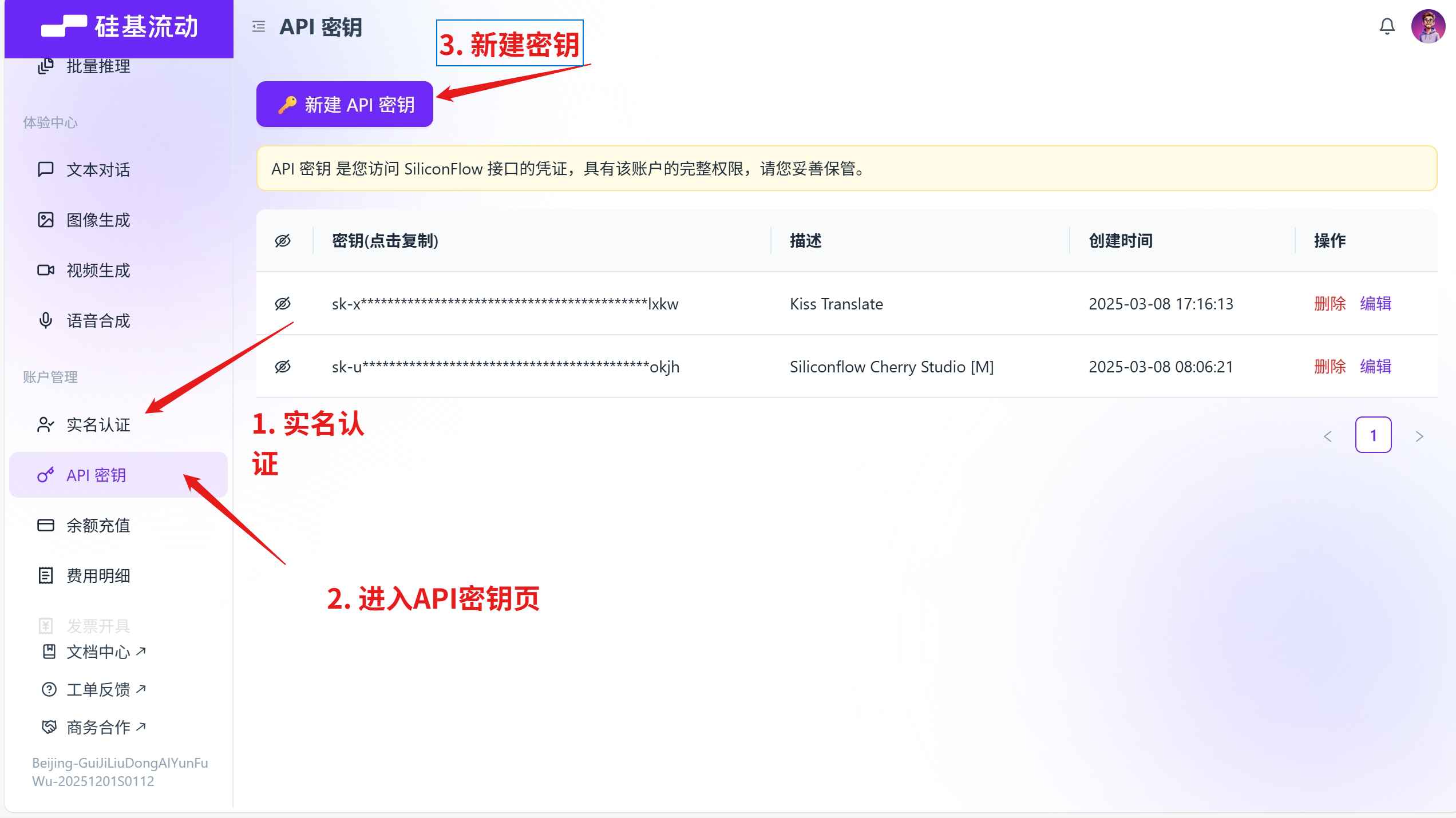
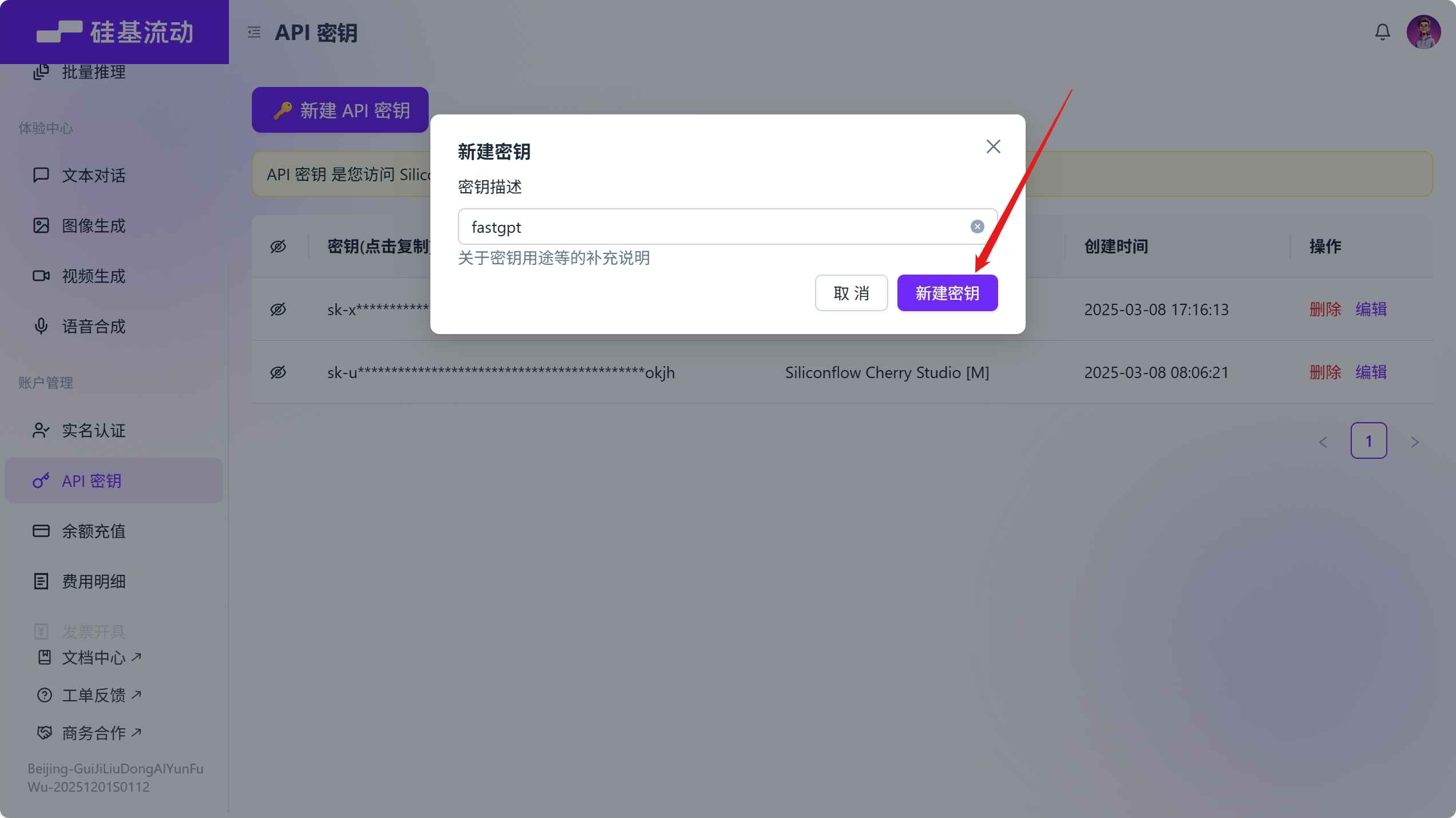
密钥生成后,点击生成的密钥复制,如果后面忘记了,进入这个界面再复制一次就行了。
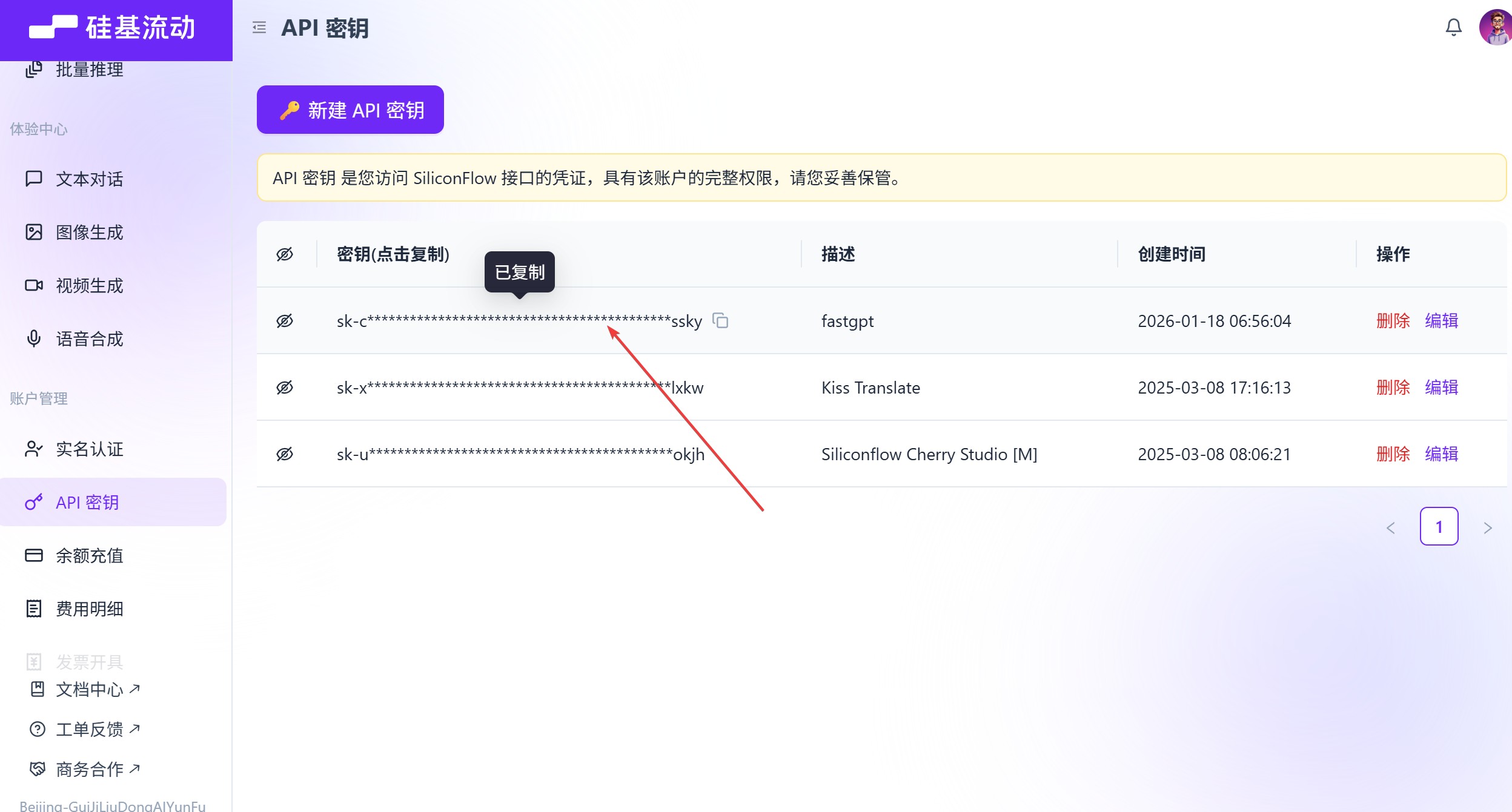
获得了密钥后接下来,就开始创建文生图工作流吧。
创建工作流
在创建工作流之前,需要先前往 FastGpt 注册一下,用于后面导入工作流配置。
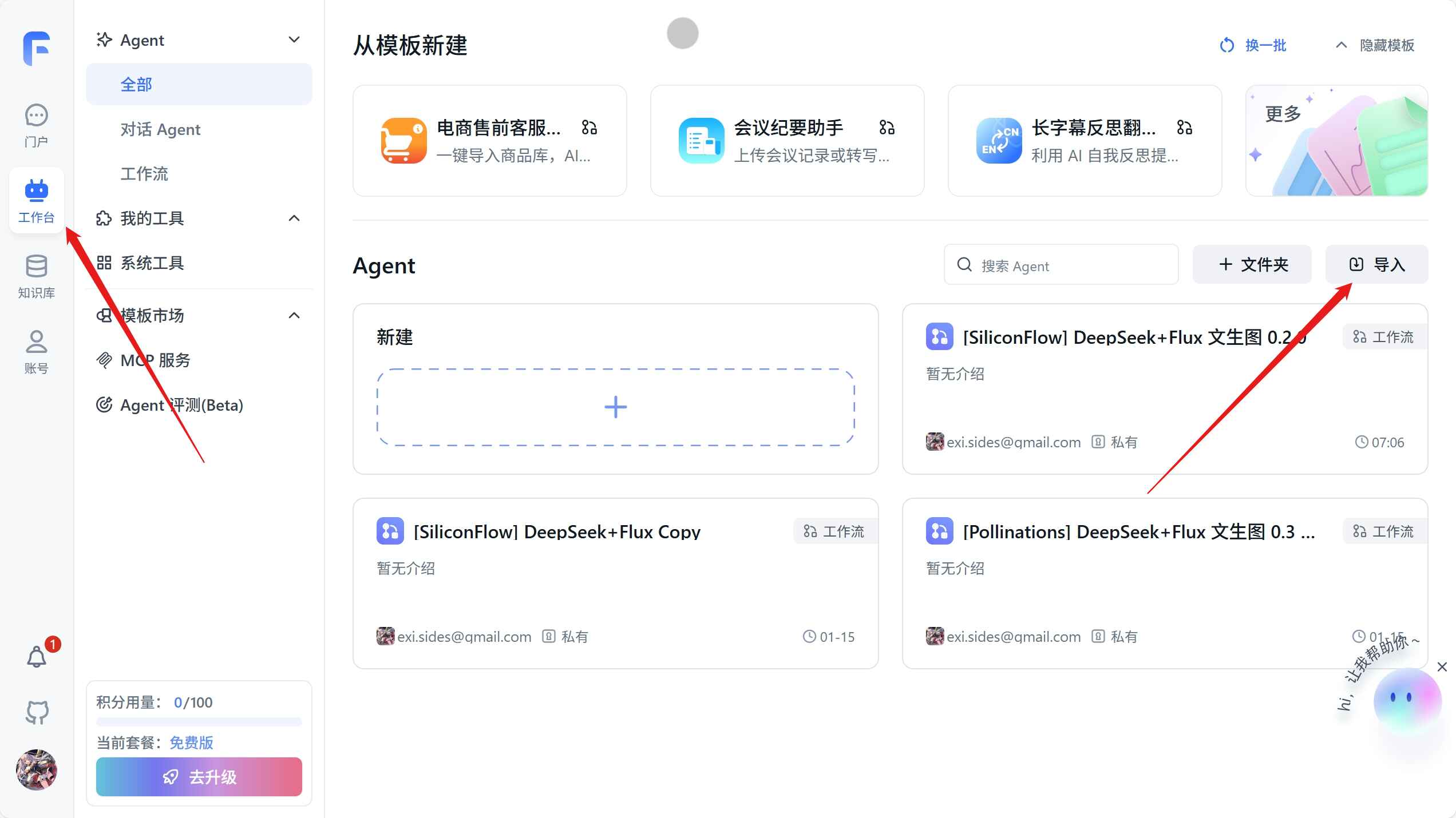
然后,我们进入工作台,点击导入我配置好的工作流。
{
"nodes": [
{
"nodeId": "userGuide",
"name": "core.module.template.User guide",
"intro": "core.app.tip.userGuideTip",
"avatar": "core/workflow/template/systemConfig",
"flowNodeType": "userGuide",
"position": {
"x": -812.5232084422751,
"y": 974.6688296337923
},
"version": "481",
"inputs": [
{
"key": "welcomeText",
"renderTypeList": ["hidden"],
"valueType": "string",
"label": "core.app.Welcome Text",
"type": "hidden",
"showTargetInApp": false,
"showTargetInPlugin": false,
"value": "您好,我是stable-diffusion文生图像绘制助手,您可以按照下面这个格式进行提问:\n[一只赛博朋克猫咪]\n[一只黑白相间的狗在追蝴蝶]",
"connected": false,
"selectedTypeIndex": 0
},
{
"key": "variables",
"renderTypeList": ["hidden"],
"valueType": "any",
"label": "core.module.Variable",
"value": [
{
"id": "6agumx",
"key": "AI优化",
"label": "是否需要使用AI优化提示词?(默认不需要)",
"type": "select",
"required": false,
"maxLen": 50,
"enums": [
{
"value": "true"
},
{
"value": "false"
}
],
"icon": "core/app/variable/select"
}
],
"type": "hidden",
"showTargetInApp": false,
"showTargetInPlugin": false,
"connected": false,
"selectedTypeIndex": 0
},
{
"key": "questionGuide",
"valueType": "boolean",
"renderTypeList": ["hidden"],
"label": "",
"type": "switch",
"showTargetInApp": false,
"showTargetInPlugin": false,
"connected": false,
"selectedTypeIndex": 0
},
{
"key": "tts",
"renderTypeList": ["hidden"],
"valueType": "any",
"label": "",
"type": "hidden",
"showTargetInApp": false,
"showTargetInPlugin": false,
"connected": false,
"selectedTypeIndex": 0
},
{
"key": "whisper",
"renderTypeList": ["hidden"],
"valueType": "any",
"label": "",
"type": "hidden",
"showTargetInApp": false,
"showTargetInPlugin": false,
"connected": false,
"selectedTypeIndex": 0
},
{
"key": "scheduleTrigger",
"renderTypeList": ["hidden"],
"valueType": "any",
"label": "",
"value": null
}
],
"outputs": []
},
{
"nodeId": "userChatInput",
"name": "流程开始",
"intro": "当用户发送一个内容后,流程将会从这个模块开始执行。",
"avatar": "core/workflow/template/workflowStart",
"flowNodeType": "workflowStart",
"position": {
"x": -778.5232084422751,
"y": 1908.6688296337923
},
"version": "481",
"inputs": [
{
"key": "userChatInput",
"renderTypeList": ["reference", "textarea"],
"valueType": "string",
"label": "workflow:user_question",
"required": true,
"toolDescription": "用户问题",
"type": "systemInput",
"showTargetInApp": false,
"showTargetInPlugin": false,
"connected": false,
"selectedTypeIndex": 0,
"value": ["userChatInput", "userChatInput"],
"debugLabel": ""
}
],
"outputs": [
{
"id": "userChatInput",
"key": "userChatInput",
"label": "common:core.module.input.label.user question",
"type": "static",
"valueType": "string",
"description": ""
}
]
},
{
"nodeId": "szqvHMArA7rG",
"name": "FLUX.1",
"intro": "可以发出一个 HTTP 请求,实现更为复杂的操作(联网搜索、数据库查询等)",
"avatar": "core/workflow/template/httpRequest",
"flowNodeType": "httpRequest468",
"showStatus": true,
"position": {
"x": 2307.476791557725,
"y": 1678.6688296337923
},
"version": "481",
"inputs": [
{
"key": "system_addInputParam",
"renderTypeList": ["addInputParam"],
"valueType": "dynamic",
"label": "",
"required": false,
"description": "common:core.module.input.description.HTTP Dynamic Input",
"editField": {
"key": true,
"valueType": true
},
"customInputConfig": {
"selectValueTypeList": [
"string",
"number",
"boolean",
"object",
"arrayString",
"arrayNumber",
"arrayBoolean",
"arrayObject",
"arrayAny",
"any",
"chatHistory",
"datasetQuote",
"dynamic",
"selectDataset",
"selectApp"
],
"showDescription": false,
"showDefaultValue": true
},
"debugLabel": "",
"toolDescription": "",
"deprecated": false
},
{
"key": "system_httpMethod",
"renderTypeList": ["custom"],
"valueType": "string",
"label": "",
"value": "POST",
"required": true,
"debugLabel": "",
"toolDescription": ""
},
{
"key": "system_httpTimeout",
"renderTypeList": ["custom"],
"valueType": "number",
"label": "",
"value": 30,
"min": 5,
"max": 600,
"required": true,
"debugLabel": "",
"toolDescription": ""
},
{
"key": "system_httpReqUrl",
"renderTypeList": ["hidden"],
"valueType": "string",
"label": "",
"description": "common:core.module.input.description.Http Request Url",
"placeholder": "https://api.ai.com/getInventory",
"required": false,
"value": "https://api.siliconflow.cn/v1/black-forest-labs/FLUX.1-schnell/text-to-image",
"debugLabel": "",
"toolDescription": ""
},
{
"key": "system_header_secret",
"renderTypeList": ["hidden"],
"valueType": "object",
"label": "",
"required": false,
"debugLabel": "",
"toolDescription": ""
},
{
"key": "system_httpHeader",
"renderTypeList": ["custom"],
"valueType": "any",
"value": [
{
"key": "authorization",
"type": "string",
"value": "Bearer {{$VARIABLE_NODE_ID.key$}}"
}
],
"label": "",
"description": "common:core.module.input.description.Http Request Header",
"placeholder": "common:core.module.input.description.Http Request Header",
"required": false,
"debugLabel": "",
"toolDescription": ""
},
{
"key": "system_httpParams",
"renderTypeList": ["hidden"],
"valueType": "any",
"value": [],
"label": "",
"required": false,
"debugLabel": "",
"toolDescription": ""
},
{
"key": "system_httpJsonBody",
"renderTypeList": ["hidden"],
"valueType": "any",
"value": "{\r\n \"prompt\": \"{{prompt}}\",\r\n \"image_size\": \"{{size}}\",\r\n \"num_inference_steps\": 28\r\n}",
"label": "",
"required": false,
"debugLabel": "",
"toolDescription": ""
},
{
"key": "system_httpFormBody",
"renderTypeList": ["hidden"],
"valueType": "any",
"value": [],
"label": "",
"required": false,
"debugLabel": "",
"toolDescription": ""
},
{
"key": "system_httpContentType",
"renderTypeList": ["hidden"],
"valueType": "string",
"value": "json",
"label": "",
"required": false,
"debugLabel": "",
"toolDescription": ""
},
{
"key": "prompt",
"valueType": "string",
"label": "prompt",
"renderTypeList": ["reference"],
"description": "",
"canEdit": true,
"editField": {
"key": true,
"valueType": true
},
"value": ["wwY9N6GttQ6yy1Wf", "kA5OFRVhGlGCCZsO"],
"customInputConfig": {
"selectValueTypeList": [
"string",
"number",
"boolean",
"object",
"arrayString",
"arrayNumber",
"arrayBoolean",
"arrayObject",
"arrayAny",
"any",
"chatHistory",
"datasetQuote",
"dynamic",
"selectDataset",
"selectApp"
],
"showDescription": false,
"showDefaultValue": true
}
},
{
"renderTypeList": ["reference"],
"valueType": "string",
"canEdit": true,
"key": "size",
"label": "size",
"customInputConfig": {
"selectValueTypeList": [
"string",
"number",
"boolean",
"object",
"arrayString",
"arrayNumber",
"arrayBoolean",
"arrayObject",
"arrayAny",
"any",
"chatHistory",
"datasetQuote",
"dynamic",
"selectDataset",
"selectApp"
],
"showDescription": false,
"showDefaultValue": true
},
"required": true,
"value": ["wwY9N6GttQ6yy1Wf", "gR0mkQpJ4Og8"]
}
],
"outputs": [
{
"id": "httpRawResponse",
"key": "httpRawResponse",
"required": true,
"label": "workflow:raw_response",
"description": "HTTP请求的原始响应。只能接受字符串或JSON类型响应数据。",
"valueType": "any",
"type": "static"
},
{
"id": "error",
"key": "error",
"label": "workflow:error_text",
"description": "HTTP请求错误信息,成功时返回空",
"valueType": "string",
"type": "error"
},
{
"id": "system_addOutputParam",
"key": "system_addOutputParam",
"type": "dynamic",
"valueType": "dynamic",
"label": "",
"editField": {
"key": true,
"valueType": true
}
},
{
"id": "q2mkKEFTiGJV",
"type": "dynamic",
"key": "images[0].url",
"valueType": "string",
"label": "images[0].url"
}
],
"catchError": true
},
{
"nodeId": "vFlAtLTLYxl7",
"name": "文本拼接",
"intro": "可对固定或传入的文本进行加工后输出,非字符串类型数据最终会转成字符串类型。",
"avatar": "core/workflow/template/textConcat",
"flowNodeType": "textEditor",
"position": {
"x": 3173.476791557725,
"y": 1923.6688296337923
},
"version": "486",
"inputs": [
{
"key": "system_textareaInput",
"renderTypeList": ["textarea"],
"valueType": "string",
"required": true,
"label": "workflow:concatenation_text",
"placeholder": "workflow:input_variable_list",
"value": "{{$wwY9N6GttQ6yy1Wf.kA5OFRVhGlGCCZsO$}}\n{{$wwY9N6GttQ6yy1Wf.gR0mkQpJ4Og8$}}\n\n下载链接:{{url}}",
"debugLabel": "",
"toolDescription": ""
},
{
"key": "system_addInputParam",
"renderTypeList": ["addInputParam"],
"valueType": "dynamic",
"label": "",
"required": false,
"description": "可以引用其他节点的输出,作为文本拼接的变量,输入 / 唤起变量列表",
"customInputConfig": {
"selectValueTypeList": [
"string",
"number",
"boolean",
"object",
"arrayString",
"arrayNumber",
"arrayBoolean",
"arrayObject",
"any",
"chatHistory",
"datasetQuote",
"dynamic",
"selectApp",
"selectDataset"
],
"showDescription": false,
"showDefaultValue": false
}
},
{
"renderTypeList": ["reference"],
"valueType": "string",
"canEdit": true,
"key": "url",
"label": "url",
"customInputConfig": {
"selectValueTypeList": [
"string",
"number",
"boolean",
"object",
"arrayString",
"arrayNumber",
"arrayBoolean",
"arrayObject",
"any",
"chatHistory",
"datasetQuote",
"dynamic",
"selectApp",
"selectDataset"
],
"showDescription": false,
"showDefaultValue": false
},
"required": true,
"value": ["szqvHMArA7rG", "q2mkKEFTiGJV"]
}
],
"outputs": [
{
"id": "system_text",
"key": "system_text",
"label": "workflow:concatenation_result",
"type": "static",
"valueType": "string",
"description": ""
}
]
},
{
"nodeId": "e6s2QseLaH23",
"name": "指定回复",
"intro": "该模块可以直接回复一段指定的内容。常用于引导、提示。非字符串内容传入时,会转成字符串进行输出。",
"avatar": "core/workflow/template/reply",
"flowNodeType": "answerNode",
"position": {
"x": 4039.476791557725,
"y": 2113.6688296337925
},
"version": "481",
"inputs": [
{
"key": "text",
"renderTypeList": ["textarea", "reference"],
"valueType": "any",
"required": true,
"label": "common:core.module.input.label.Response content",
"description": "common:core.module.input.description.Response content",
"placeholder": "common:core.module.input.description.Response content",
"selectedTypeIndex": 1,
"value": ["vFlAtLTLYxl7", "system_text"],
"debugLabel": "",
"toolDescription": "",
"isRichText": false,
"maxLength": 100000
}
],
"outputs": []
},
{
"nodeId": "jhXGZgAjkPZ7",
"name": "变量更新",
"intro": "可以更新指定节点的输出值或更新全局变量",
"avatar": "core/workflow/template/variableUpdate",
"flowNodeType": "variableUpdate",
"showStatus": false,
"position": {
"x": -170.52320844227506,
"y": 1759.6688296337923
},
"version": "481",
"inputs": [
{
"key": "updateList",
"valueType": "any",
"label": "",
"renderTypeList": ["hidden"],
"value": [
{
"variable": ["VARIABLE_NODE_ID", "key"],
"value": ["", ""],
"valueType": "string",
"renderType": "input"
},
{
"variable": ["VARIABLE_NODE_ID", "model"],
"value": ["", "deepseek-ai/DeepSeek-V3"],
"renderType": "input",
"valueType": "string"
},
{
"variable": ["VARIABLE_NODE_ID", "system"],
"value": [
"",
"你是一个精准的JSON解析助手,你需要完成下面列举的2个任务,第二个任务依赖于第一个任务\n严格按以下规则执行:\n1. 只返回最终格式,禁止任何额外说明或确认,禁止添加额外字符前缀\n2. 输出最终格式为JSON,例如:\n {\n \"size\": ”1024x768\",\n \"prompt\": \"A girl, best quality.\"\n }\n\n任务:\n1.作为 Stable Diffusion Prompt 提示词专家,您将从关键词中创建提示,通常来自 Danbooru 等数据库。\n\n提示通常描述图像,使用常见词汇,按重要性排列,并用逗号分隔。避免使用\"-\"或\".\",但可以接受空格和自然语言。避免词汇重复。\n\n为了强调关键词,请将其放在括号中以增加其权重。例如,\"(flowers)\"将'flowers'的权重增加1.1倍,而\"(((flowers)))\"将其增加1.331倍。使用\"(flowers:1.5)\"将'flowers'的权重增加1.5倍。只为重要的标签增加权重。\n\n提示包括三个部分:**前缀**(质量标签+风格词+效果器)+ **主题**(图像的主要焦点)+ **场景**(背景、环境)。\n\n* 前缀影响图像质量。像\"masterpiece\"、\"best quality\"、\"4k\"这样的标签可以提高图像的细节。像\"illustration\"、\"lensflare\"这样的风格词定义图像的风格。像\"bestlighting\"、\"lensflare\"、\"depthoffield\"这样的效果器会影响光照和深度。\n\n* 主题是图像的主要焦点,如角色或场景。对主题进行详细描述可以确保图像丰富而详细。增加主题的权重以增强其清晰度。对于角色,描述面部、头发、身体、服装、姿势等特征。\n\n* 场景描述环境。没有场景,图像的背景是平淡的,主题显得过大。某些主题本身包含场景(例如建筑物、风景)。像\"花草草地\"、\"阳光\"、\"河流\"这样的环境词可以丰富场景。你的任务是设计图像生成的提示。请按照以下步骤进行操作:\n\n1. 我会发送给您一个图像场景。需要你生成详细的图像描述\n2. 图像描述必须是英文,输出为Prompt。\n\n示例:\n\n我发送:二战时期的护士 2048x2048。\n您需要转化的prompr为:\nA WWII-era nurse in a German uniform, holding a wine bottle and stethoscope, sitting at a table in white attire, with a table in the background, masterpiece, best quality, 4k, illustration style, best lighting, depth of field, detailed character, detailed environment.\n\n2.请从用户输入的图片描述中提取以下信息:\n\n 提示词(prompt): 图片描述内容,通常是\"a cute girl\"这样描述性文字\n 长宽(size): 如果用户指定了图片尺寸如\"2048x2048\"\n 提取规则:\n 首先识别图片描述(prompt)\n 然后在描述中寻找类似\"数字x数字\"的格式(如2048x2048)来提取尺寸\n 如果没有明确指定尺寸,则使用默认值size=2048x2048\n 提示词应去除任何尺寸相关的内容\n 返回格式要求为JSON对象:\n {\n \"size\": 提取的宽度值或默认值2048x提取的高度值或默认值2048,\n \"prompt\": \"提取的提示词文本\"\n }\n\n 示例1:\n 用户输入: \"二战时期的护士 1024x768\"\n 输出:\n {\n \"size\": \"1024x768\",\n \"prompt\": \"A WWII-era nurse in a German uniform, holding a wine bottle and stethoscope, sitting at a table in white attire, with a table in the background, masterpiece, best quality, 4k, illustration style, best lighting, depth of field, detailed character, detailed environment.\"\n }\n"
],
"renderType": "input",
"valueType": "string"
}
],
"valueDesc": "",
"description": "",
"debugLabel": "",
"toolDescription": ""
}
],
"outputs": []
},
{
"nodeId": "wOluZuvGJF84InnA",
"name": "HTTP 请求#2",
"intro": "可以发出一个 HTTP 请求,实现更为复杂的操作(联网搜索、数据库查询等)",
"avatar": "core/workflow/template/httpRequest",
"flowNodeType": "httpRequest468",
"showStatus": true,
"position": {
"x": 575.4767915577249,
"y": 1678.6688296337923
},
"version": "481",
"inputs": [
{
"key": "system_addInputParam",
"renderTypeList": ["addInputParam"],
"valueType": "dynamic",
"label": "",
"required": false,
"description": "common:core.module.input.description.HTTP Dynamic Input",
"customInputConfig": {
"selectValueTypeList": [
"string",
"number",
"boolean",
"object",
"arrayString",
"arrayNumber",
"arrayBoolean",
"arrayObject",
"arrayAny",
"any",
"chatHistory",
"datasetQuote",
"dynamic",
"selectDataset",
"selectApp"
],
"showDescription": false,
"showDefaultValue": true
},
"valueDesc": "",
"debugLabel": "",
"toolDescription": "",
"deprecated": false
},
{
"key": "system_httpMethod",
"renderTypeList": ["custom"],
"valueType": "string",
"label": "",
"value": "POST",
"required": true,
"valueDesc": "",
"description": "",
"debugLabel": "",
"toolDescription": ""
},
{
"key": "system_httpTimeout",
"renderTypeList": ["custom"],
"valueType": "number",
"label": "",
"value": 30,
"min": 5,
"max": 600,
"required": true,
"valueDesc": "",
"description": "",
"debugLabel": "",
"toolDescription": ""
},
{
"key": "system_httpReqUrl",
"renderTypeList": ["hidden"],
"valueType": "string",
"label": "",
"description": "common:core.module.input.description.Http Request Url",
"placeholder": "https://api.ai.com/getInventory",
"required": false,
"value": "https://api.siliconflow.cn/v1/chat/completions",
"valueDesc": "",
"debugLabel": "",
"toolDescription": ""
},
{
"key": "system_header_secret",
"renderTypeList": ["hidden"],
"valueType": "object",
"label": "",
"required": false,
"debugLabel": "",
"toolDescription": ""
},
{
"key": "system_httpHeader",
"renderTypeList": ["custom"],
"valueType": "any",
"value": [
{
"key": "authorization",
"type": "string",
"value": "Bearer {{$VARIABLE_NODE_ID.key$}}"
}
],
"label": "",
"description": "common:core.module.input.description.Http Request Header",
"placeholder": "common:core.module.input.description.Http Request Header",
"required": false,
"valueDesc": "",
"debugLabel": "",
"toolDescription": ""
},
{
"key": "system_httpParams",
"renderTypeList": ["hidden"],
"valueType": "any",
"value": [],
"label": "",
"required": false,
"valueDesc": "",
"description": "",
"debugLabel": "",
"toolDescription": ""
},
{
"key": "system_httpJsonBody",
"renderTypeList": ["hidden"],
"valueType": "any",
"value": "{\n \"model\": \"{{model}}\",\n \"messages\": [\n {\"role\": \"system\", \"content\": \"{{system}}\"},\n {\"role\": \"user\", \"content\": \"{{prompt}}\"}\n ],\n \"response_format\": {\"type\": \"text\"}\n}",
"label": "",
"required": false,
"valueDesc": "",
"description": "",
"debugLabel": "",
"toolDescription": ""
},
{
"key": "system_httpFormBody",
"renderTypeList": ["hidden"],
"valueType": "any",
"value": [],
"label": "",
"required": false,
"valueDesc": "",
"description": "",
"debugLabel": "",
"toolDescription": ""
},
{
"key": "system_httpContentType",
"renderTypeList": ["hidden"],
"valueType": "string",
"value": "json",
"label": "",
"required": false,
"valueDesc": "",
"description": "",
"debugLabel": "",
"toolDescription": ""
},
{
"renderTypeList": ["reference"],
"valueType": "string",
"canEdit": true,
"key": "model",
"label": "model",
"customInputConfig": {
"selectValueTypeList": [
"string",
"number",
"boolean",
"object",
"arrayString",
"arrayNumber",
"arrayBoolean",
"arrayObject",
"arrayAny",
"any",
"chatHistory",
"datasetQuote",
"dynamic",
"selectDataset",
"selectApp"
],
"showDescription": false,
"showDefaultValue": true
},
"required": true,
"value": ["VARIABLE_NODE_ID", "model"]
},
{
"renderTypeList": ["reference"],
"valueType": "string",
"canEdit": true,
"key": "prompt",
"label": "prompt",
"customInputConfig": {
"selectValueTypeList": [
"string",
"number",
"boolean",
"object",
"arrayString",
"arrayNumber",
"arrayBoolean",
"arrayObject",
"arrayAny",
"any",
"chatHistory",
"datasetQuote",
"dynamic",
"selectDataset",
"selectApp"
],
"showDescription": false,
"showDefaultValue": true
},
"required": true,
"value": ["userChatInput", "userChatInput"]
},
{
"renderTypeList": ["reference"],
"valueType": "string",
"canEdit": true,
"key": "system",
"label": "system",
"customInputConfig": {
"selectValueTypeList": [
"string",
"number",
"boolean",
"object",
"arrayString",
"arrayNumber",
"arrayBoolean",
"arrayObject",
"arrayAny",
"any",
"chatHistory",
"datasetQuote",
"dynamic",
"selectDataset",
"selectApp"
],
"showDescription": false,
"showDefaultValue": true
},
"required": true,
"value": ["VARIABLE_NODE_ID", "system"]
}
],
"outputs": [
{
"id": "httpRawResponse",
"key": "httpRawResponse",
"required": true,
"label": "workflow:raw_response",
"description": "HTTP请求的原始响应。只能接受字符串或JSON类型响应数据。",
"valueType": "any",
"type": "static"
},
{
"id": "error",
"key": "error",
"label": "workflow:error_text",
"description": "HTTP请求错误信息,成功时返回空",
"valueType": "string",
"type": "error"
},
{
"id": "system_addOutputParam",
"key": "system_addOutputParam",
"type": "dynamic",
"valueType": "dynamic",
"label": "输出字段提取",
"customFieldConfig": {
"selectValueTypeList": [
"string",
"number",
"boolean",
"object",
"arrayString",
"arrayNumber",
"arrayBoolean",
"arrayObject",
"arrayAny",
"any",
"chatHistory",
"datasetQuote",
"dynamic",
"selectDataset",
"selectApp"
],
"showDescription": false,
"showDefaultValue": false
},
"description": "可以通过 JSONPath 语法来提取响应值中的指定字段",
"valueDesc": ""
}
],
"catchError": true
},
{
"nodeId": "wwY9N6GttQ6yy1Wf",
"name": "代码运行",
"intro": "执行一段简单的脚本代码,通常用于进行复杂的数据处理。",
"avatar": "core/workflow/template/codeRun",
"flowNodeType": "code",
"showStatus": true,
"position": {
"x": 1441.476791557725,
"y": 1751.1688296337923
},
"version": "482",
"inputs": [
{
"key": "system_addInputParam",
"renderTypeList": ["addInputParam"],
"valueType": "dynamic",
"label": "",
"required": false,
"description": "workflow:these_variables_will_be_input_parameters_for_code_execution",
"customInputConfig": {
"selectValueTypeList": [
"string",
"number",
"boolean",
"object",
"arrayString",
"arrayNumber",
"arrayBoolean",
"arrayObject",
"arrayAny",
"any",
"chatHistory",
"datasetQuote",
"dynamic",
"selectDataset",
"selectApp"
],
"showDescription": false,
"showDefaultValue": true
},
"valueDesc": "",
"debugLabel": "",
"toolDescription": ""
},
{
"key": "codeType",
"renderTypeList": ["hidden"],
"label": "",
"valueType": "string",
"value": "js",
"valueDesc": "",
"description": "",
"debugLabel": "",
"toolDescription": ""
},
{
"key": "code",
"renderTypeList": ["custom"],
"label": "",
"valueType": "string",
"value": "function main({data}){\n const jsonData = JSON.parse(data);\n const content = jsonData.choices[0].message.content\n \n const jsonContent = JSON.parse(content) \n const {size, prompt} = jsonContent\n \n return {\n size,\n prompt\n }\n}",
"valueDesc": "",
"description": "",
"debugLabel": "",
"toolDescription": ""
},
{
"renderTypeList": ["reference"],
"valueType": "string",
"canEdit": true,
"key": "data",
"label": "data",
"customInputConfig": {
"selectValueTypeList": [
"string",
"number",
"boolean",
"object",
"arrayString",
"arrayNumber",
"arrayBoolean",
"arrayObject",
"arrayAny",
"any",
"chatHistory",
"datasetQuote",
"dynamic",
"selectDataset",
"selectApp"
],
"showDescription": false,
"showDefaultValue": true
},
"required": true,
"value": ["wOluZuvGJF84InnA", "httpRawResponse"],
"valueDesc": "",
"description": "",
"debugLabel": "",
"toolDescription": ""
}
],
"outputs": [
{
"id": "system_rawResponse",
"key": "system_rawResponse",
"label": "workflow:full_response_data",
"valueType": "object",
"type": "static",
"description": ""
},
{
"id": "error",
"key": "error",
"label": "workflow:error_text",
"description": "代码运行错误信息,成功时返回空",
"valueType": "string",
"type": "error"
},
{
"id": "system_addOutputParam",
"key": "system_addOutputParam",
"type": "dynamic",
"valueType": "dynamic",
"label": "",
"customFieldConfig": {
"selectValueTypeList": [
"string",
"number",
"boolean",
"object",
"arrayString",
"arrayNumber",
"arrayBoolean",
"arrayObject",
"arrayAny",
"any",
"chatHistory",
"datasetQuote",
"dynamic",
"selectDataset",
"selectApp"
],
"showDescription": false,
"showDefaultValue": false
},
"description": "将代码中 return 的对象作为输出,传递给后续的节点。变量名需要对应 return 的 key",
"valueDesc": ""
},
{
"id": "gR0mkQpJ4Og8",
"type": "dynamic",
"key": "size",
"valueType": "string",
"label": "size",
"valueDesc": "",
"description": ""
},
{
"id": "kA5OFRVhGlGCCZsO",
"valueType": "string",
"type": "dynamic",
"key": "prompt",
"label": "prompt"
}
],
"catchError": true
}
],
"edges": [
{
"source": "vFlAtLTLYxl7",
"target": "e6s2QseLaH23",
"sourceHandle": "vFlAtLTLYxl7-source-right",
"targetHandle": "e6s2QseLaH23-target-left"
},
{
"source": "szqvHMArA7rG",
"target": "vFlAtLTLYxl7",
"sourceHandle": "szqvHMArA7rG-source-right",
"targetHandle": "vFlAtLTLYxl7-target-left"
},
{
"source": "userChatInput",
"target": "jhXGZgAjkPZ7",
"sourceHandle": "userChatInput-source-right",
"targetHandle": "jhXGZgAjkPZ7-target-left"
},
{
"source": "jhXGZgAjkPZ7",
"target": "wOluZuvGJF84InnA",
"sourceHandle": "jhXGZgAjkPZ7-source-right",
"targetHandle": "wOluZuvGJF84InnA-target-left"
},
{
"source": "wOluZuvGJF84InnA",
"target": "wwY9N6GttQ6yy1Wf",
"sourceHandle": "wOluZuvGJF84InnA-source-right",
"targetHandle": "wwY9N6GttQ6yy1Wf-target-left"
},
{
"source": "wwY9N6GttQ6yy1Wf",
"target": "szqvHMArA7rG",
"sourceHandle": "wwY9N6GttQ6yy1Wf-source-right",
"targetHandle": "szqvHMArA7rG-target-left"
},
{
"source": "szqvHMArA7rG",
"target": "vFlAtLTLYxl7",
"sourceHandle": "szqvHMArA7rG-source_catch-right",
"targetHandle": "vFlAtLTLYxl7-target-left"
},
{
"source": "wOluZuvGJF84InnA",
"target": "wwY9N6GttQ6yy1Wf",
"sourceHandle": "wOluZuvGJF84InnA-source_catch-right",
"targetHandle": "wwY9N6GttQ6yy1Wf-target-left"
},
{
"source": "wwY9N6GttQ6yy1Wf",
"target": "szqvHMArA7rG",
"sourceHandle": "wwY9N6GttQ6yy1Wf-source_catch-right",
"targetHandle": "szqvHMArA7rG-target-left"
}
],
"chatConfig": {
"welcomeText": "您好,我是FLUX.1 AI绘画小助手.\n\n直接输入提示词即可使用AI绘画。AI自动优化提示词",
"variables": [
{
"id": "aaexc5",
"key": "key",
"label": "key",
"type": "custom",
"description": "硅基密钥",
"required": false,
"valueType": "string",
"list": [
{
"value": "sk-",
"label": "sk-"
},
{
"label": " ",
"value": " "
}
],
"defaultValue": "sk-",
"enums": [
{
"value": "sk-",
"label": "sk-"
},
{
"label": " ",
"value": " "
}
],
"icon": "core/workflow/inputType/input"
},
{
"id": "8b9v0e",
"key": "system",
"label": "system",
"type": "custom",
"description": "",
"required": false,
"valueType": "string",
"list": [
{
"value": "",
"label": ""
}
],
"defaultValue": "",
"enums": [
{
"value": "",
"label": ""
}
]
},
{
"id": "uar3i1",
"key": "model",
"label": "model",
"type": "custom",
"description": "",
"required": false,
"valueType": "string",
"list": [
{
"value": "",
"label": ""
}
],
"defaultValue": "",
"enums": [
{
"value": "",
"label": ""
}
],
"icon": "core/workflow/inputType/input"
}
],
"whisperConfig": {
"open": true,
"autoSend": false,
"autoTTSResponse": false
},
"scheduledTriggerConfig": {
"cronString": "",
"timezone": "Asia/Shanghai",
"defaultPrompt": ""
},
"_id": "66c4a5e9501b65de6749f604"
}
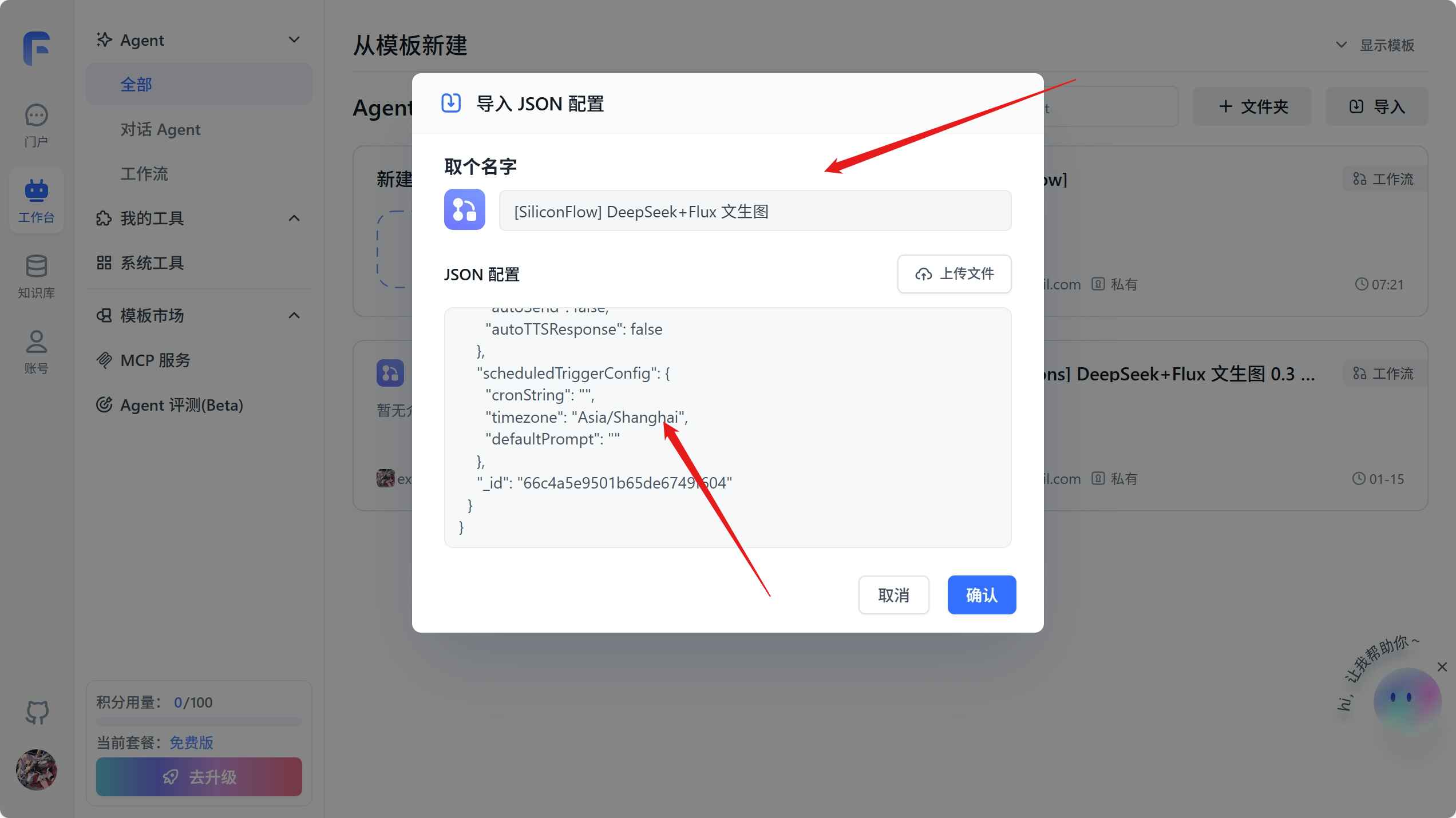
}给工作流写个名字,然后复制上面的工作流配置到 JSON 配置,点击确认
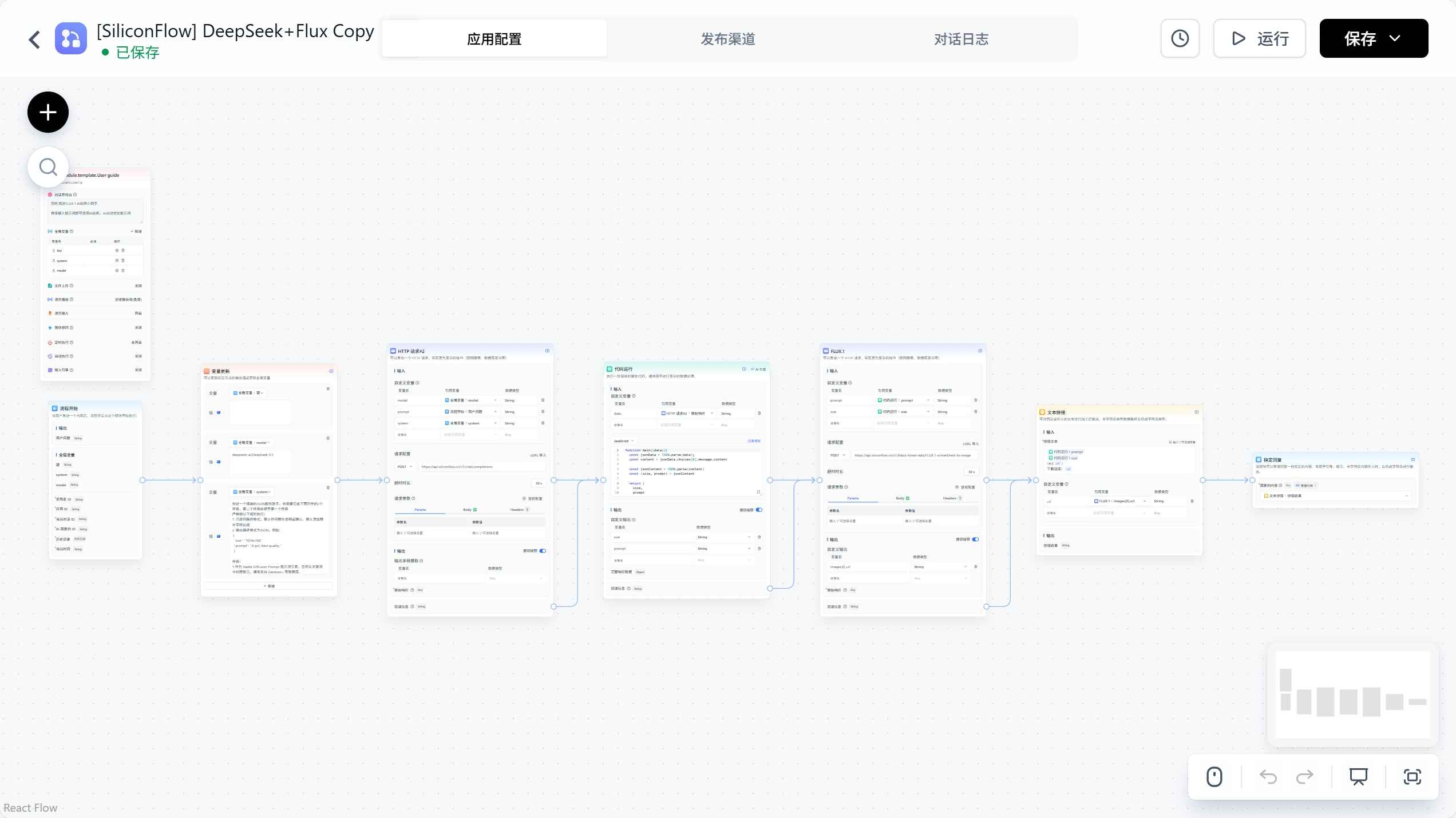
导入之后的工作流就是下面的样子
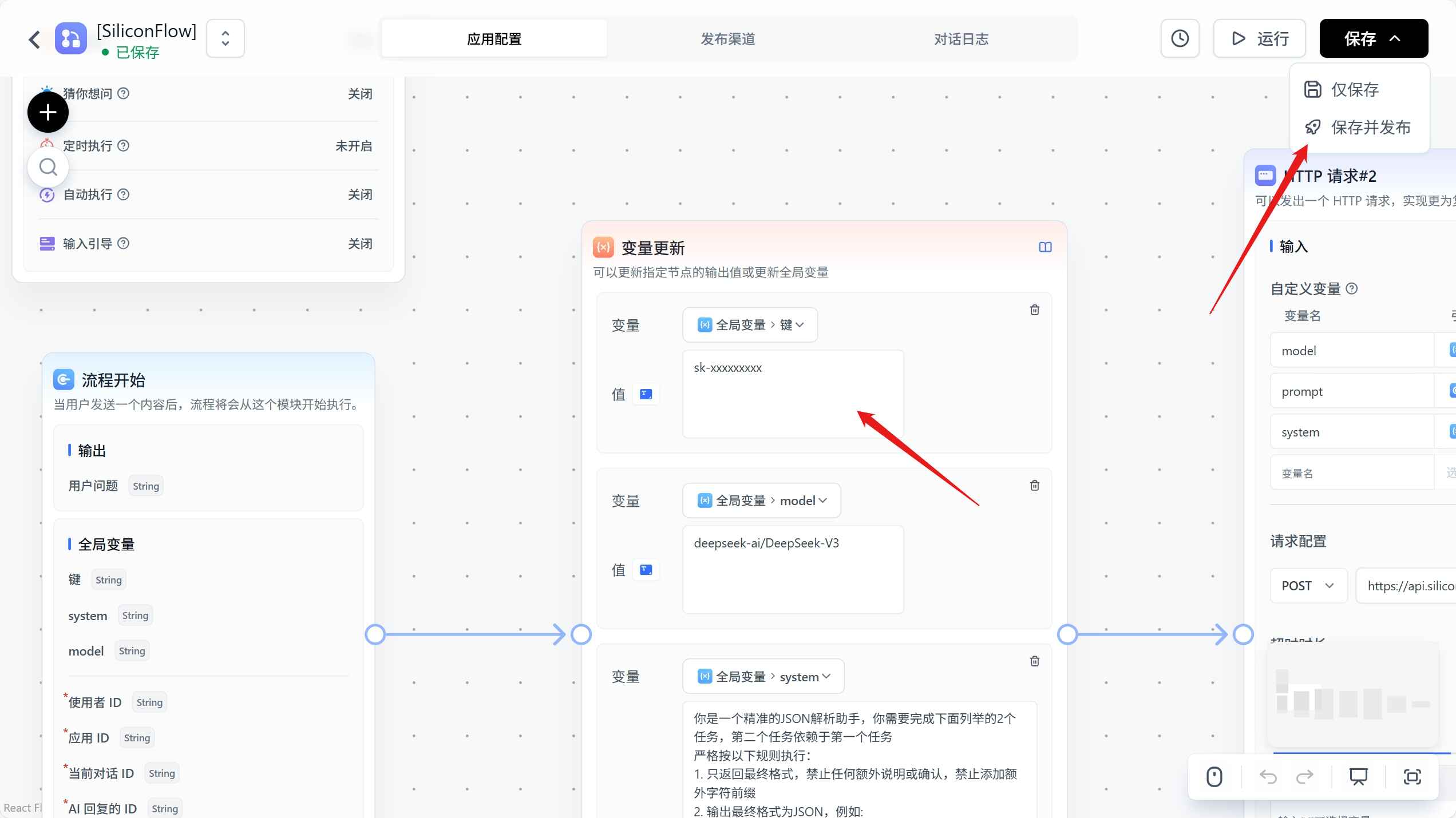
然后找到变量更新,将之前我们创建的硅基流动的 API sk密钥复制到 全局变量>键,点击保存>保存并发布。
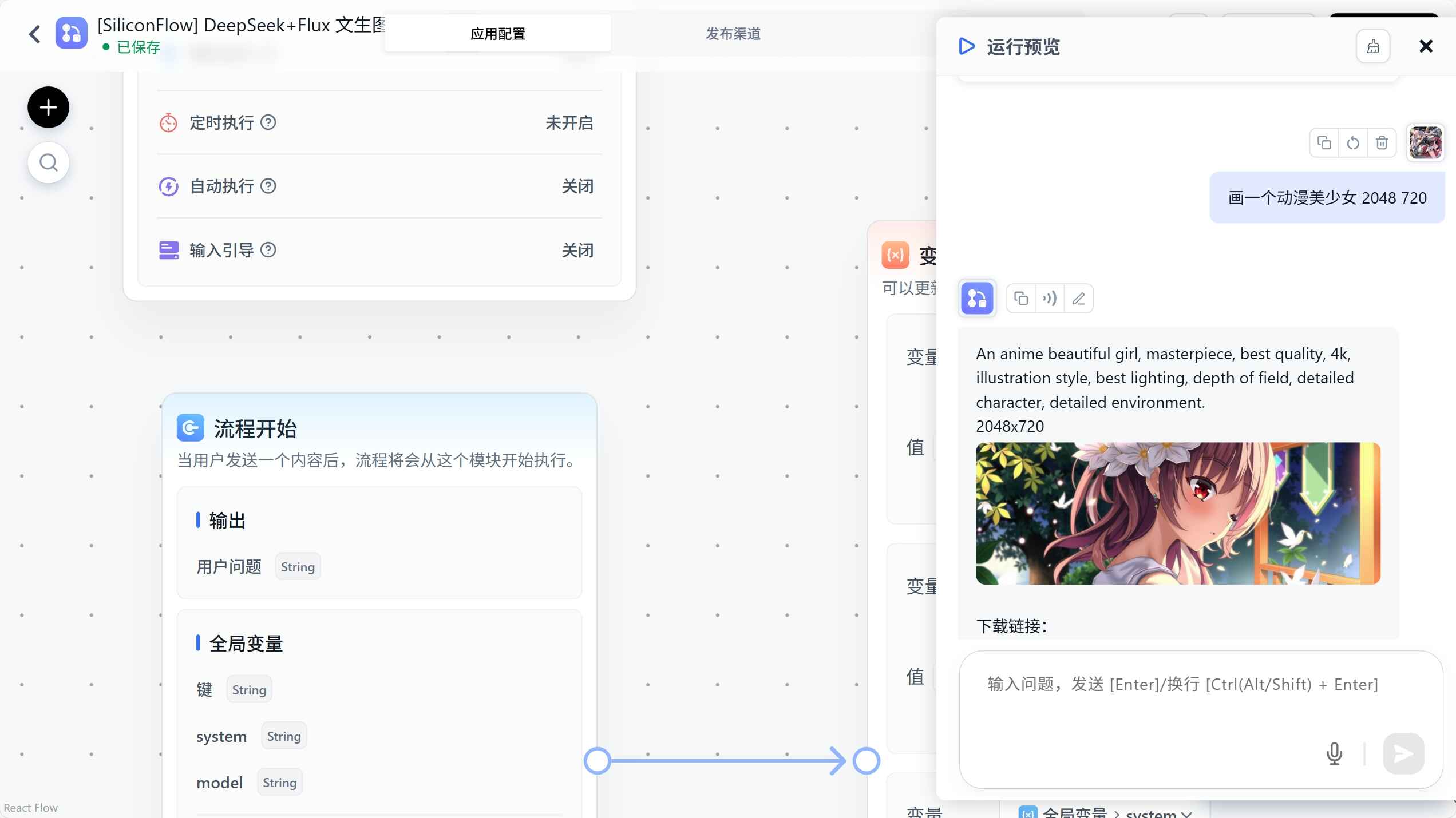
到这里我们就可以测试文生图效果了,点击右上角的运行>开始对话,输入要生成的图片描述就行了。
API 访问
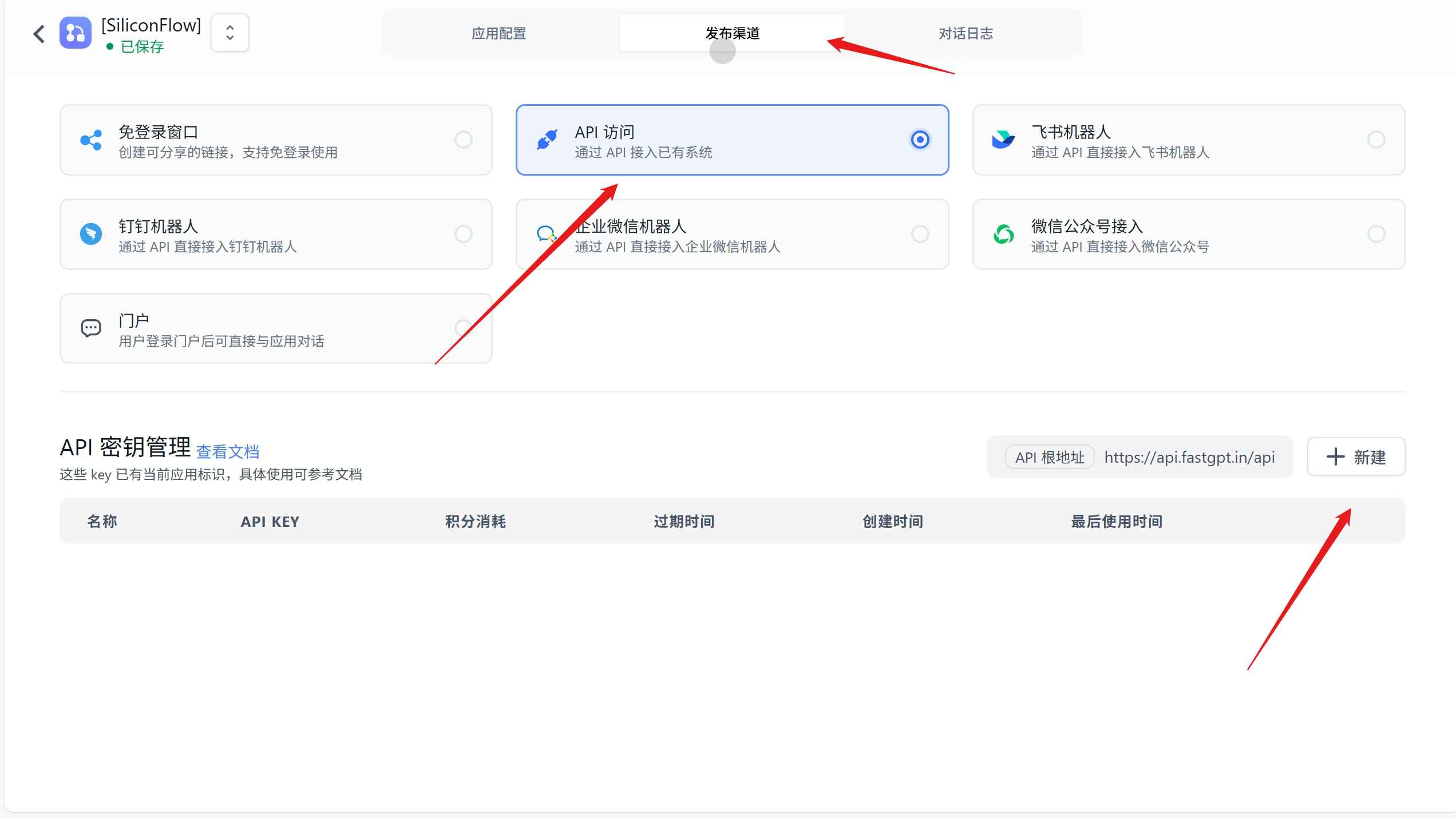
为了使用 API 形式进行访问,所以我们还需要点击顶部的发布渠道,选中 API 访问,点击新建。
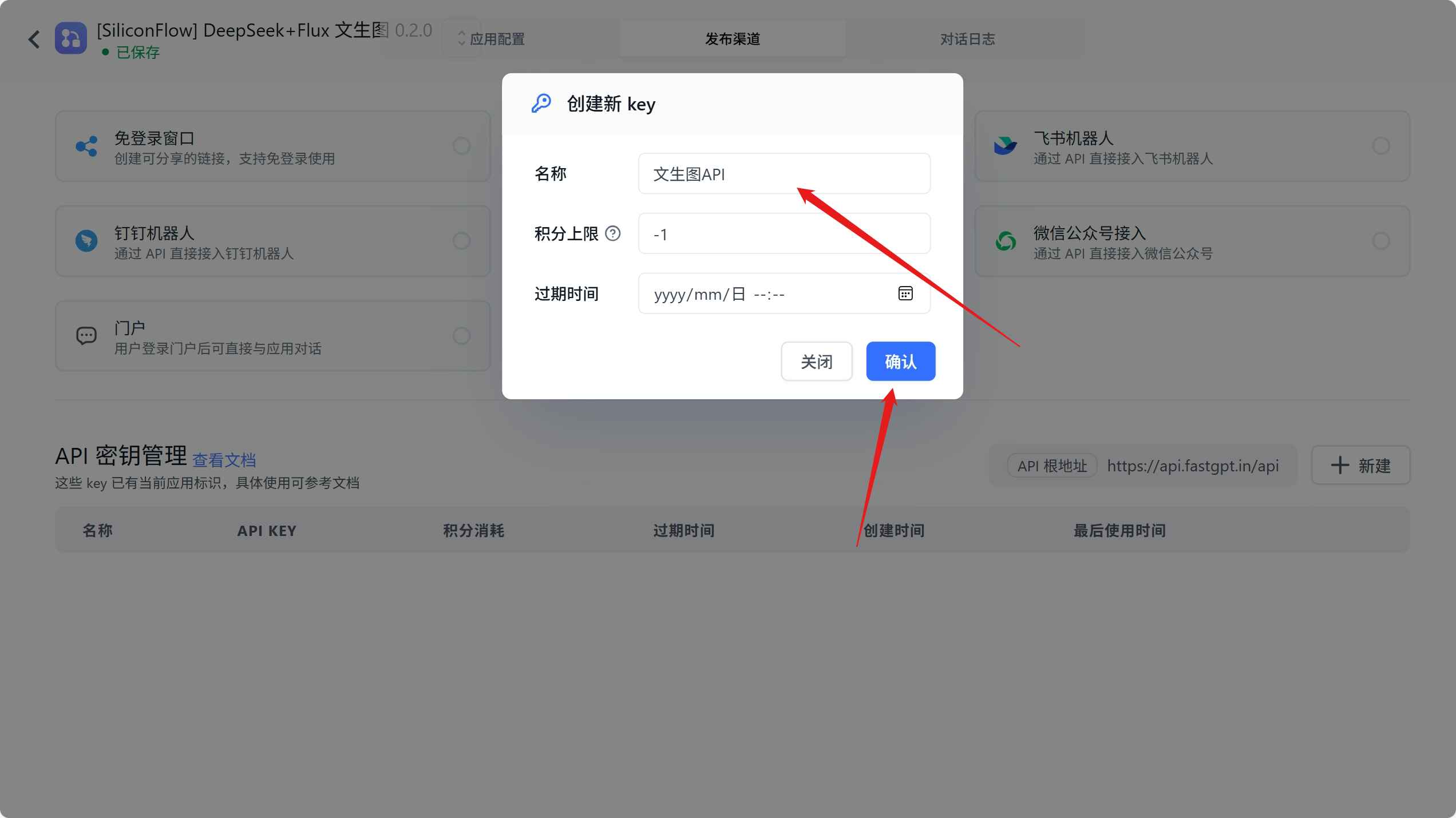
输入名称确认,创建一个 API 密钥。
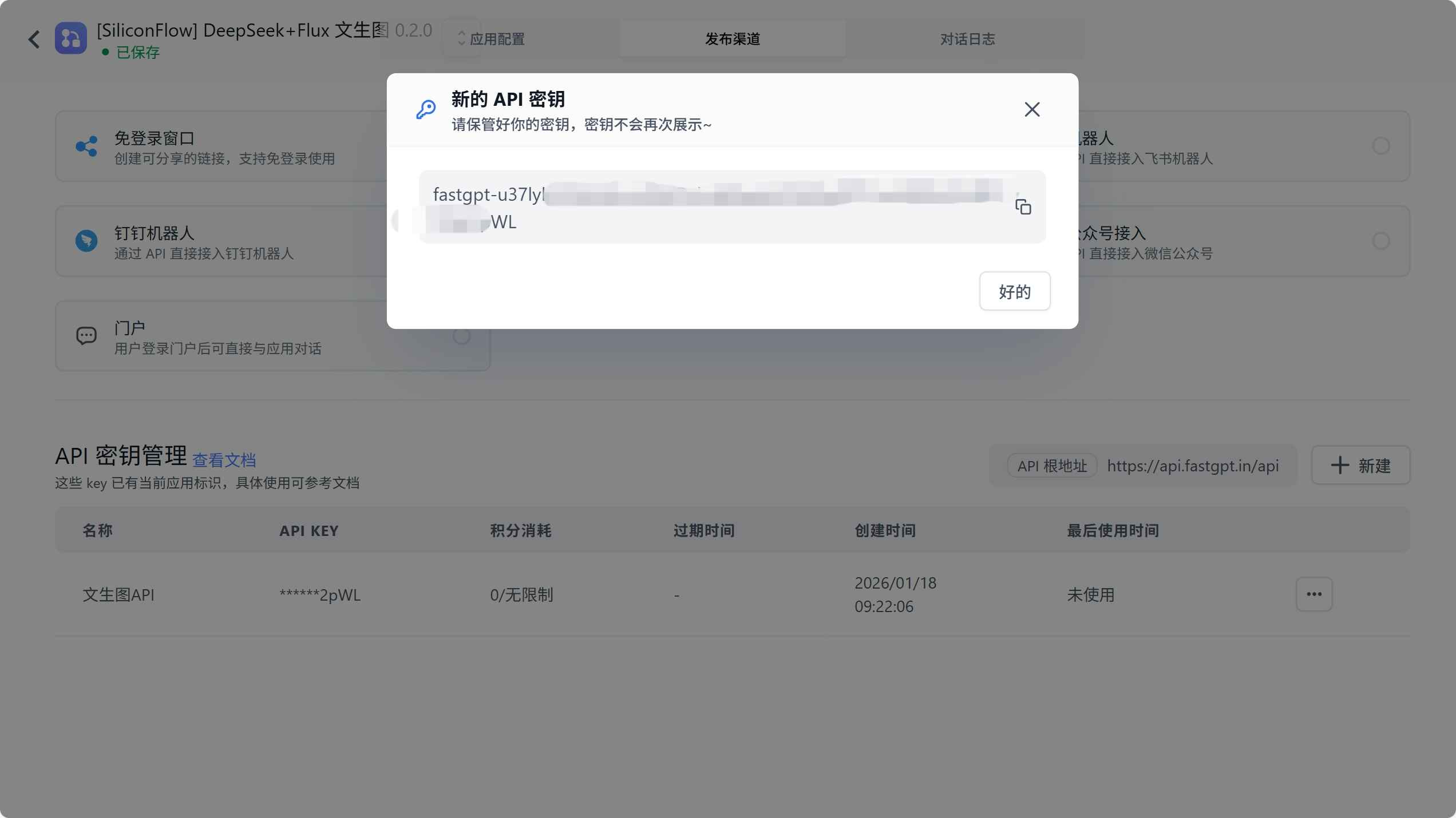
创建完成密钥后会弹出密钥弹窗,这里要复制密钥保存下来,弹窗关闭后就没法再次复制了。
在 Chatbox 中使用文生图 API
Chatbox 是一个半开源的 AI API 桌面客户端,我们可以将上面生成的 API 在这个客户端中使用。
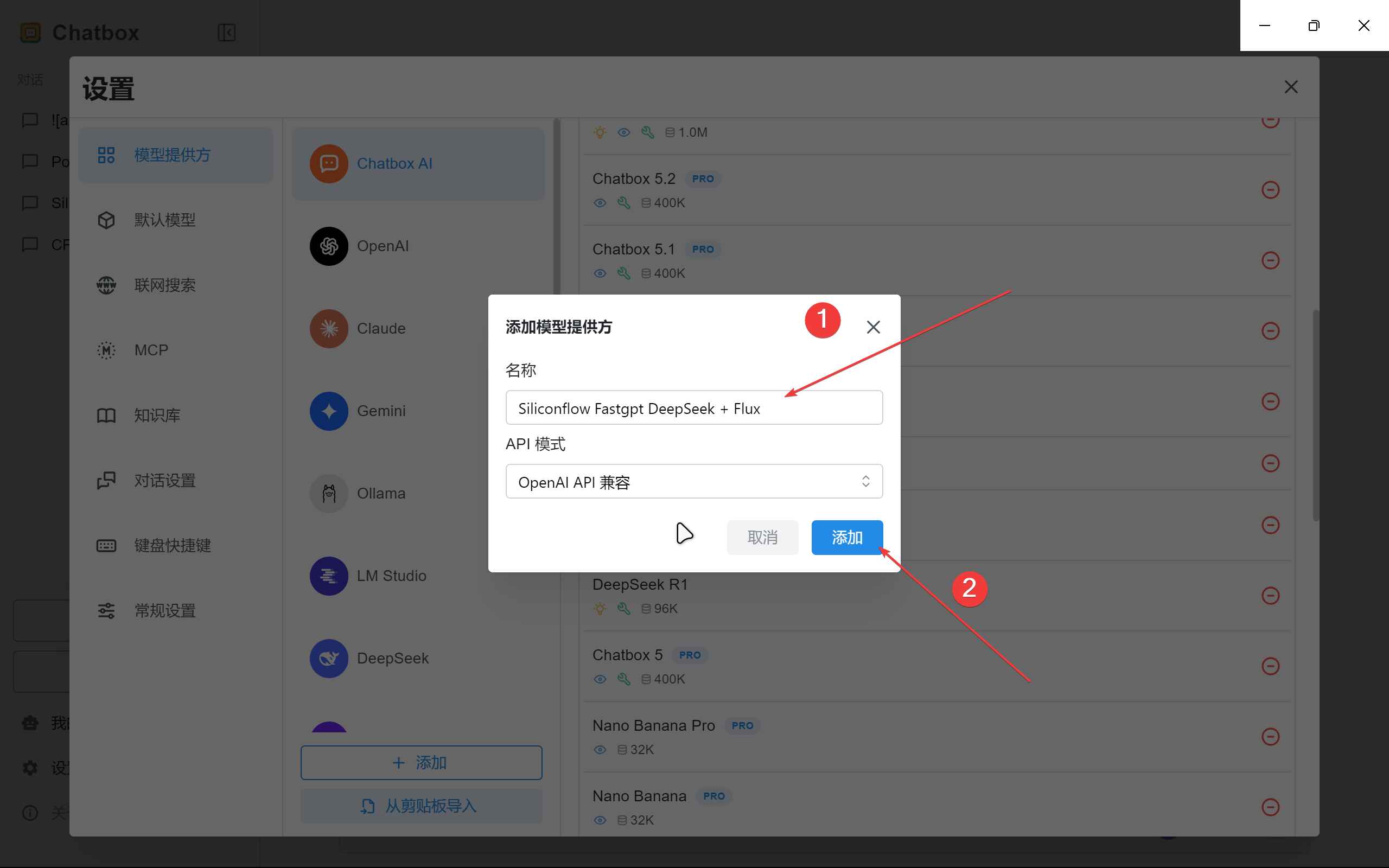
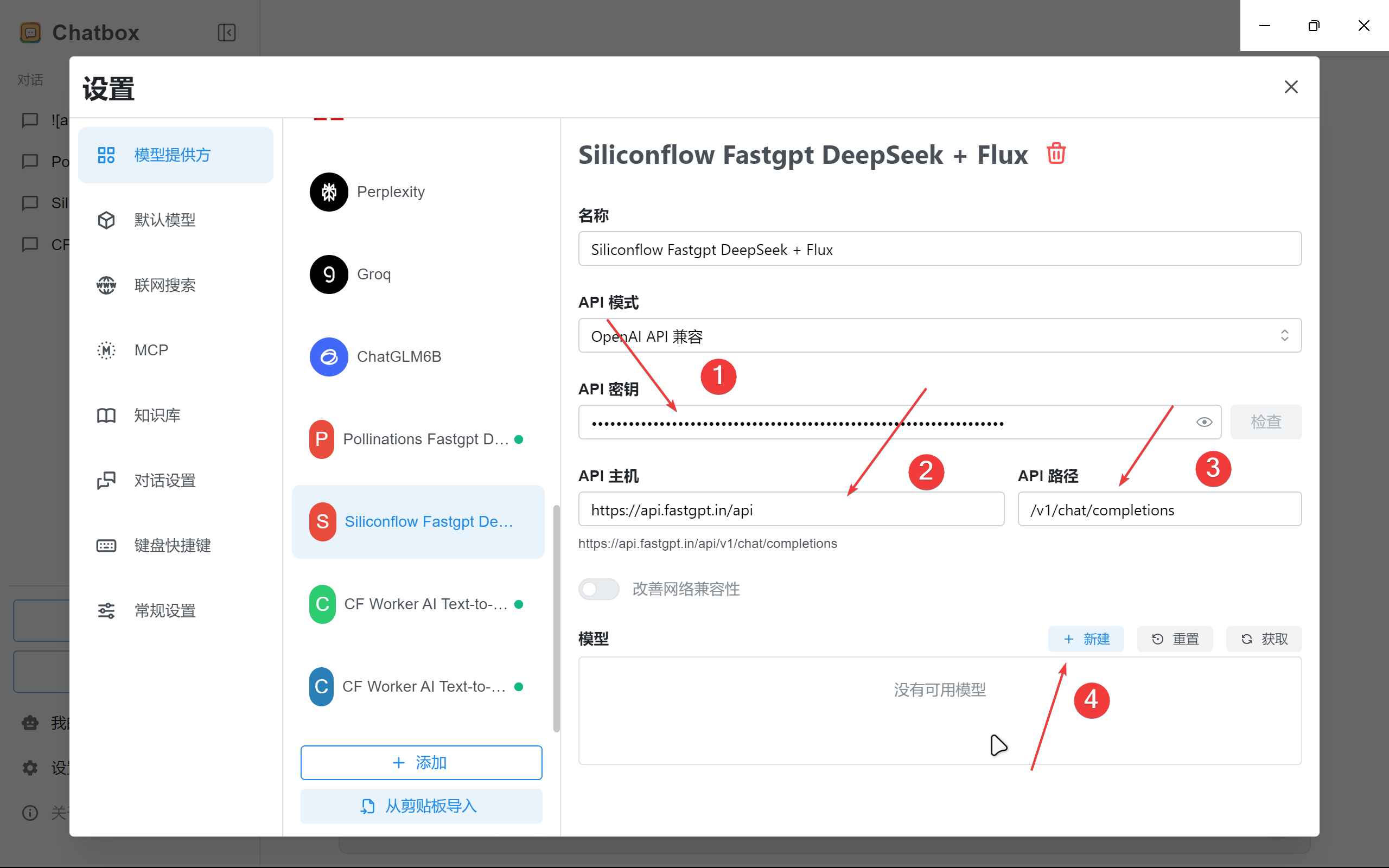
首先,我们需要进入设置,在模型提供商底部点击添加,输入提供商名称,提供商默认 OpenAI API 兼容,点击确认。
然后,在 API 密钥输入上面我们复制到的工作流密钥,并且在 API 主机和 API 路径中分别填入 https://api.fastgpt.in/api 和 /v1/chat/completions,然后点击创建新建一个模型。
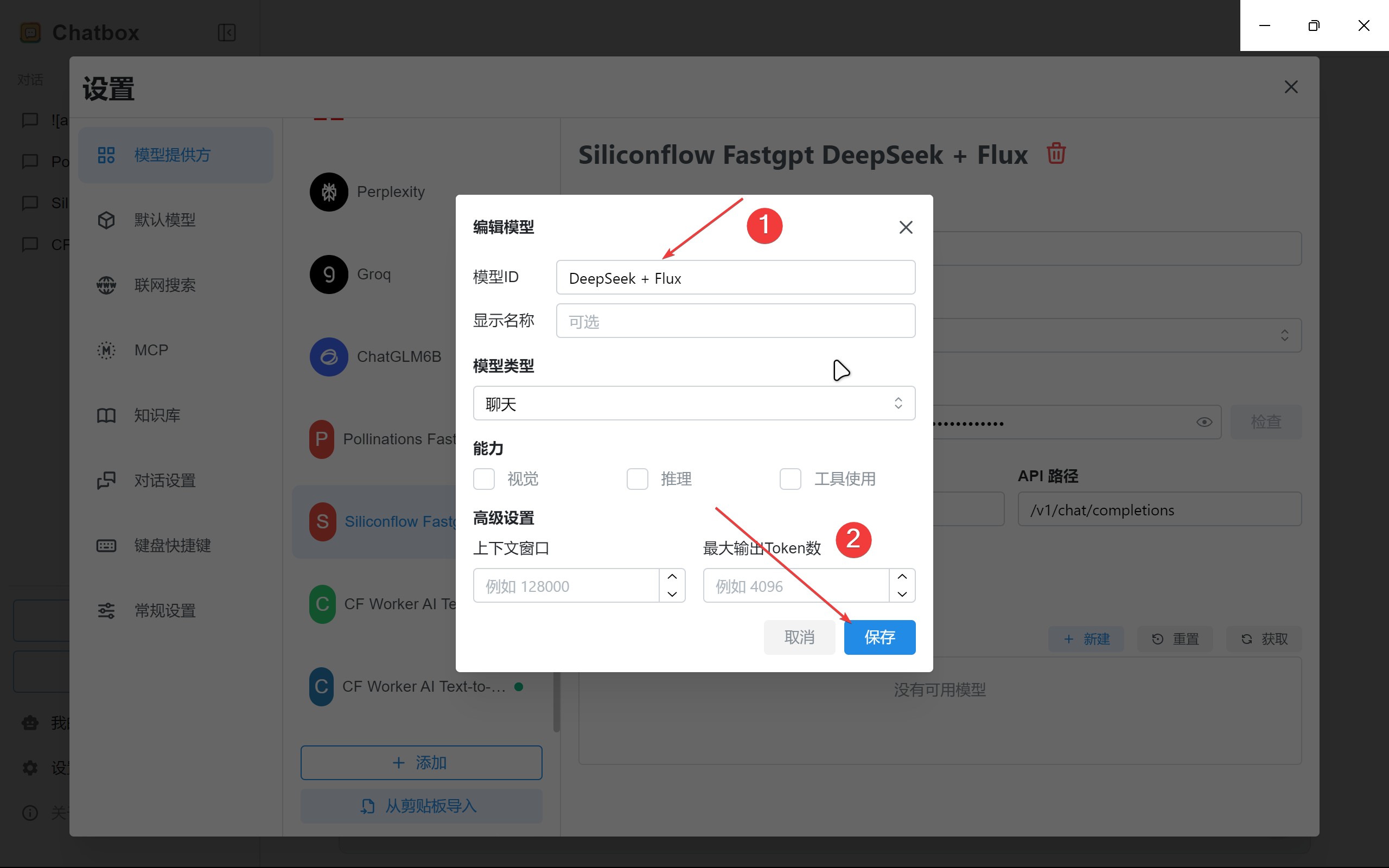
因为我们是工作流发布的 API,没有模型的名称,随便输入一个名字用来区分就行了
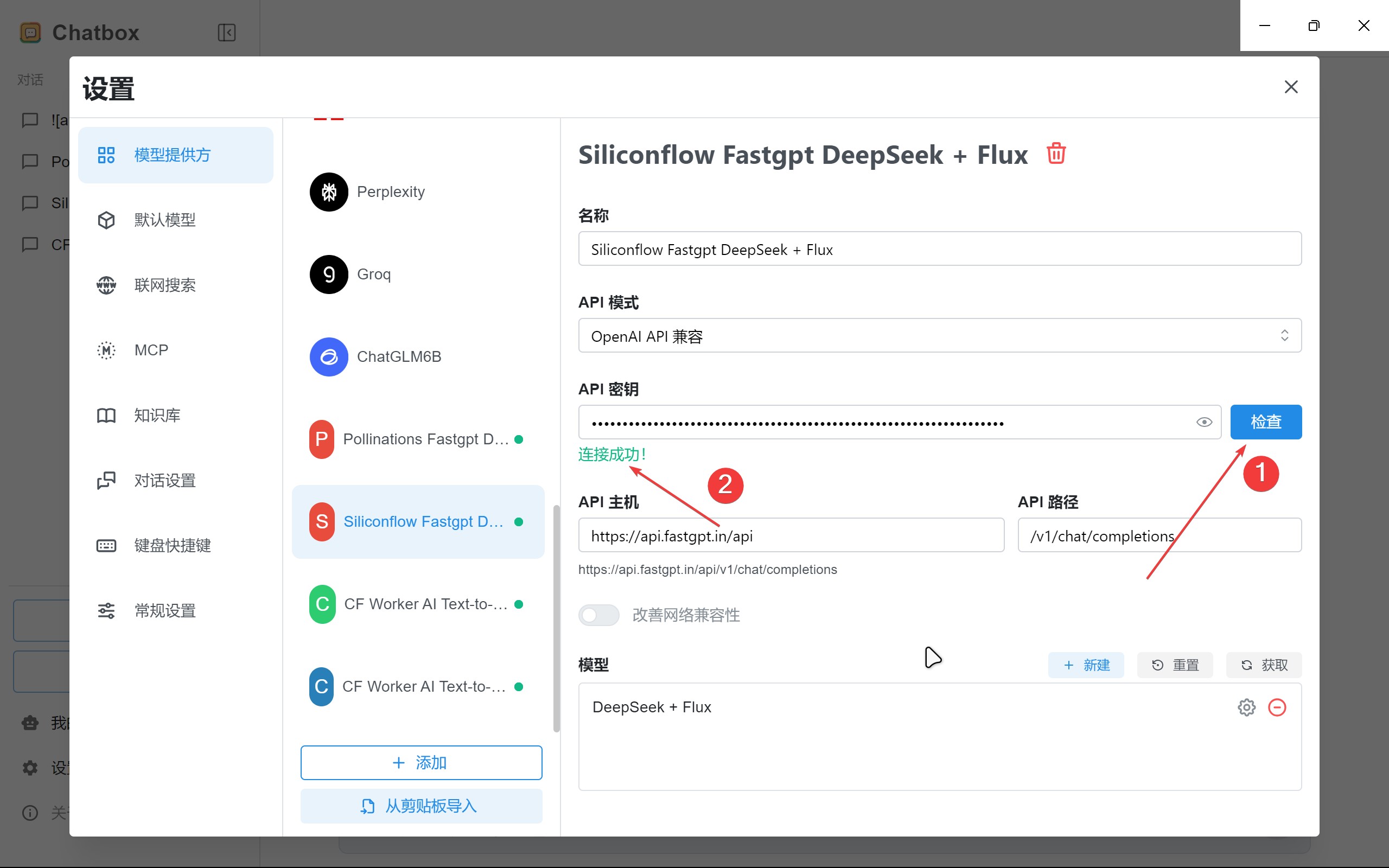
我们还需要检测一下配置能不能正常访问,点击密钥旁边的检测按钮,选择我们刚才添加的模型,点击确认。如果提示
最后回到首页,创建一个新对话,点击输入框底部的模型选择,选择我们配置的模型。
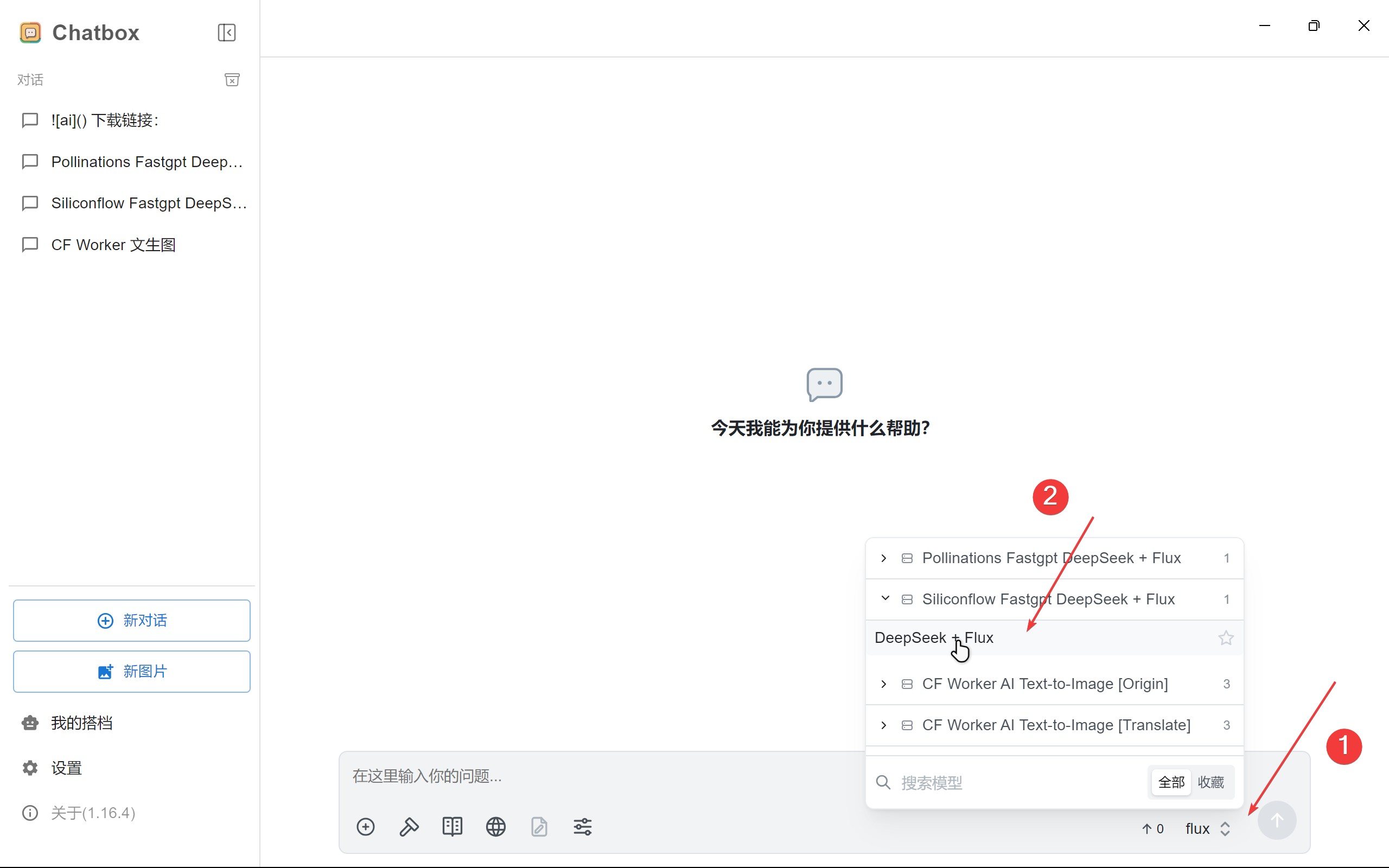
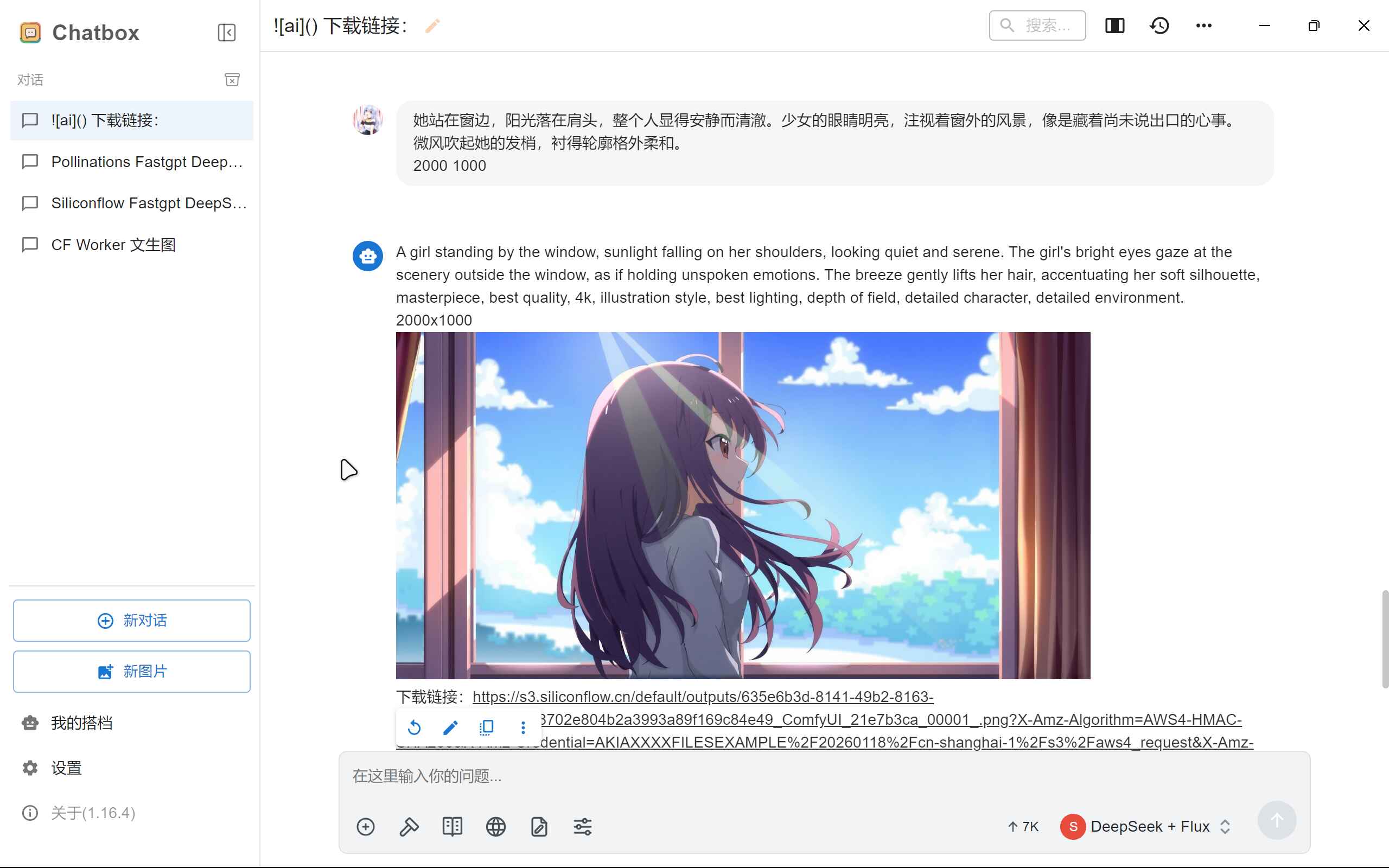
现在我们就能像测试的那样,直接进行对话了。
结语
有一个能够通过 API 对话的文生图工作流,就不需要再使用类似的网页的免费工具了。比起各种积分限制的工具,我还是更喜欢对话的形式去创建一些有趣的东西,更符合直觉。
文生图应该还会继续流行下去,到时候可能就不再需要输入关键词了,模型本身就能很好的理解提示词,直接就能生成想要的图片效果,而不是像现在这种取舍的方式。